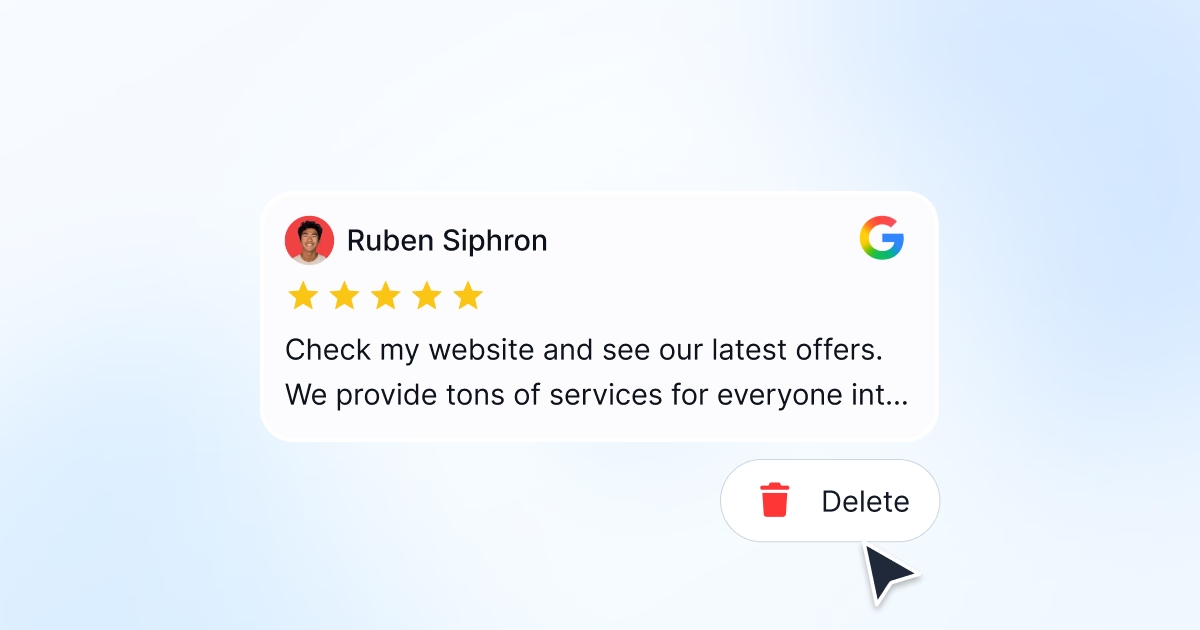


This guide covers every scenario for removing a Google review: deleting a review you wrote yourself, flagging fake or inappropriate reviews on your business profile, and appealing when Google does not act on your initial report.

Manage Google reviews for all your locations from one dashboard. Centralize replies, automate with AI, and track review trends across every branch.
Start free trialCan you delete a Google review?
The answer depends on who wrote it.
If you wrote the review, you can delete it yourself at any time. It is your content, the option sits in your Google Maps contributions, and removal is immediate and permanent.
If a customer wrote it about your business, you cannot delete it. No setting, no dashboard, and no support agent will remove a review on request. The only path is to flag it and show Google that it breaks a specific content policy. Google then decides.
That distinction matters because it sets expectations. Business owners often spend weeks looking for a delete button that does not exist. The realistic goal is not removal of every review you dislike. It is removal of the reviews that genuinely violate policy, plus a strong public reply on everything else.
| Situation | Can it be removed? | How |
|---|---|---|
| You wrote the review | Yes, immediately | Delete it from Your contributions |
| Fake review, reviewer was never a customer | Often | Flag as Spam, then appeal with evidence |
| Review from a competitor or former employee | Often | Flag as Conflict of interest |
| Review containing a phone number or address | Usually | Flag as Personal information |
| Review about a different business | Usually | Flag as Off-topic |
| Honest negative review | No | Reply publicly and professionally |
| One star with no text | No | Reply publicly and ask for detail |
How to delete a Google review you wrote
If you left a review and want to remove it, you can do it from Google Maps or Google Search. If you would rather change the wording or star rating instead of removing it, see how to edit your Google review.
From Google Maps (desktop)
-
Open Google Maps and sign in to the Google account you used to write the review.
-
Click the hamburger menu (three lines) in the top left, then click Your contributions.
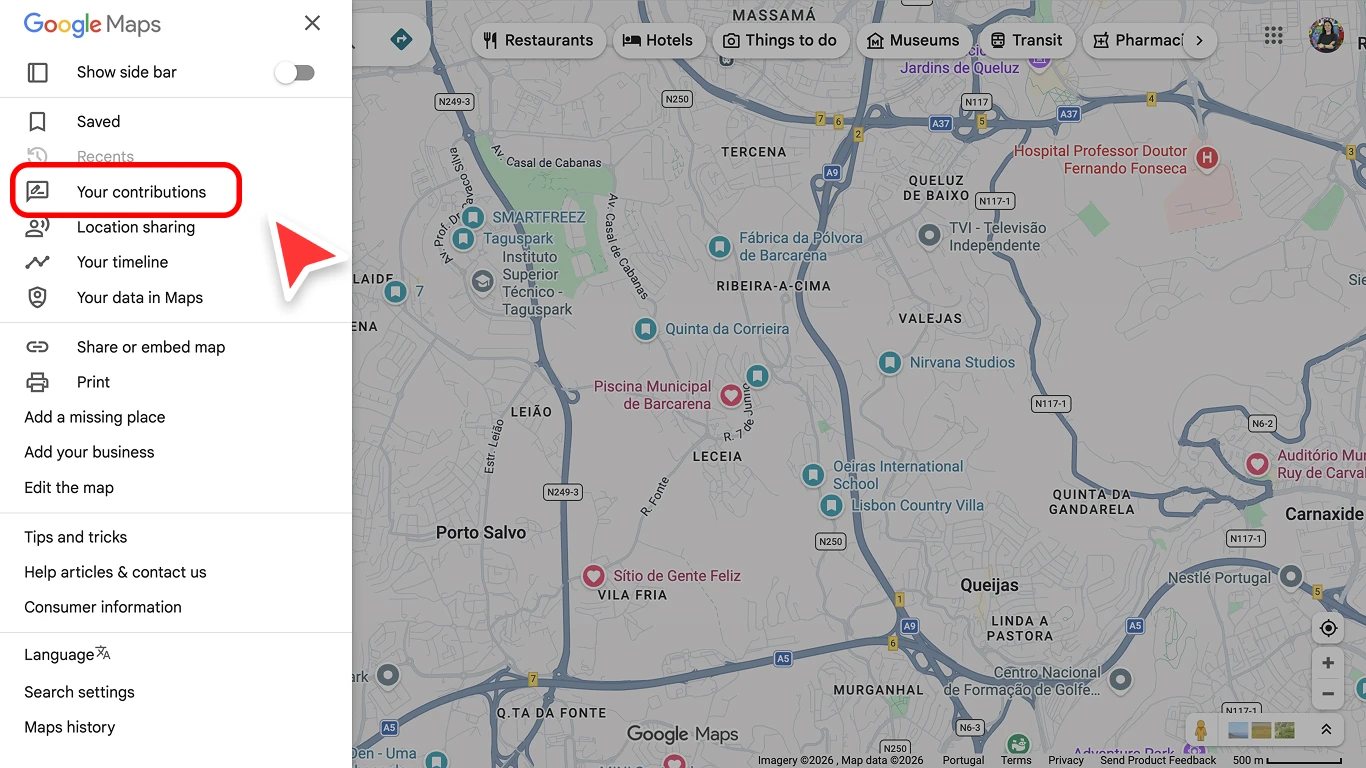
Google Maps sidebar menu with the Your contributions option highlighted -
Click the Reviews tab to see all reviews you have written.
-
Find the review you want to delete and click the three-dot menu next to it.
-
Click Delete review.
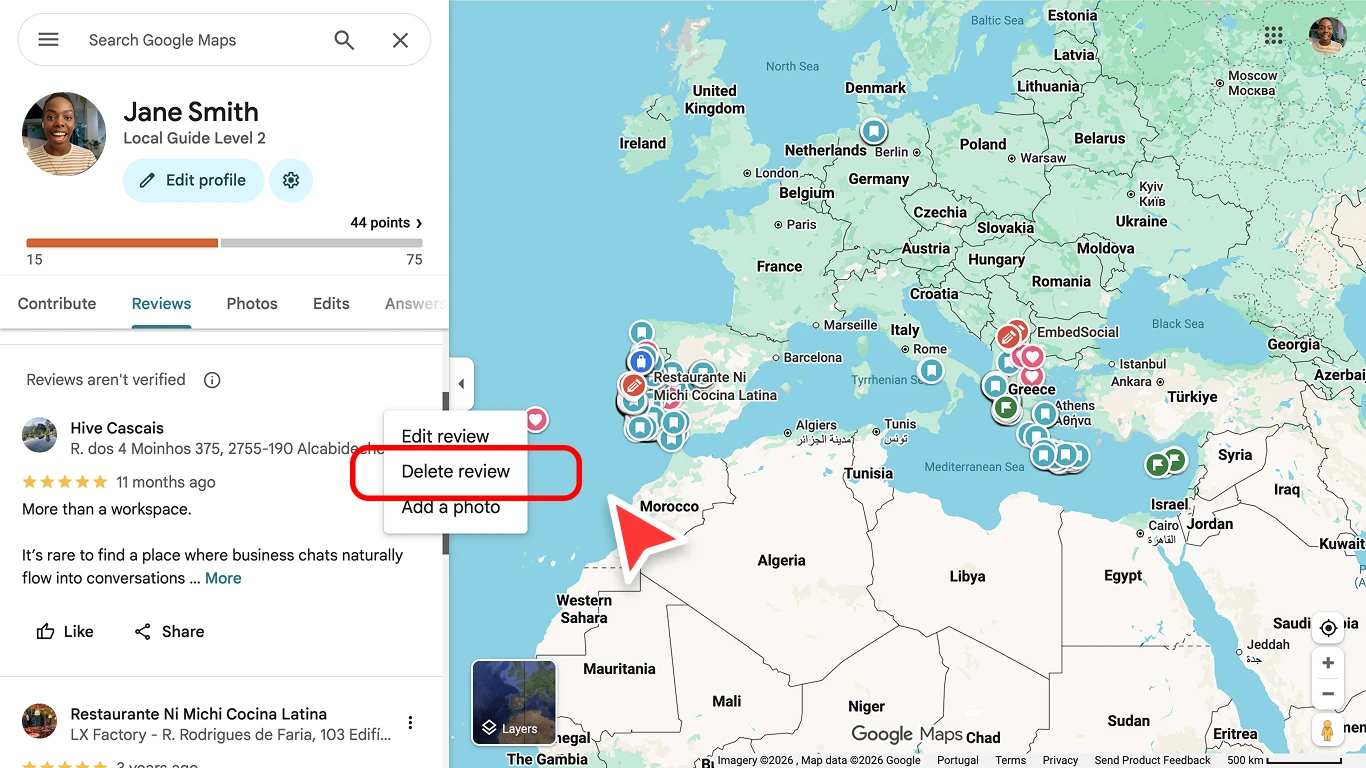
Google Maps contributions page showing the Delete review option in the three-dot menu -
Confirm the deletion when prompted.


The review is removed immediately and permanently. There is no way to undo this.
From Google Maps (mobile)
- Open the Google Maps app on your phone.
- Tap your profile picture in the top right, then tap Your profile.
- Scroll down to your reviews and find the one you want to delete.
- Tap the three-dot menu next to the review.
- Tap Delete review and confirm.
From Google Search
- Search for the business name on Google.
- Find your review in the reviews section of the business listing.
- Click the three-dot menu next to your review.
- Click Delete review and confirm.
If you cannot find the review you wrote
If your review is not listed under Your contributions, work through these in order.
- Check the account. Most missing reviews are sitting under a second Google account. Sign out and sign back in with every address you use, including work accounts.
- Check whether Google already removed it. Google filters reviews it reads as spam or policy-breaking, sometimes months after posting. Removed reviews disappear from your contributions without notice.
- Check the business still exists on Maps. If the listing was merged, closed, or deleted, reviews attached to it can stop showing.
- Give it a few minutes after posting. A new review takes a short while to appear across every Google surface.
If the review is visible publicly but missing from your contributions, you are almost certainly signed in to the wrong account.
How to flag a review on your Google Business Profile
If someone left a fake, spam, or inappropriate review on your business profile, you can flag it for removal. Business owners cannot delete customer reviews directly. You can only report them to Google.
Step 1: Find the review
Sign in to your Google Business Profile. Click Read reviews to access your reviews list.

Find the review you want to report.
Step 2: Flag the review
-
Click the flag icon next to the review you want to report.
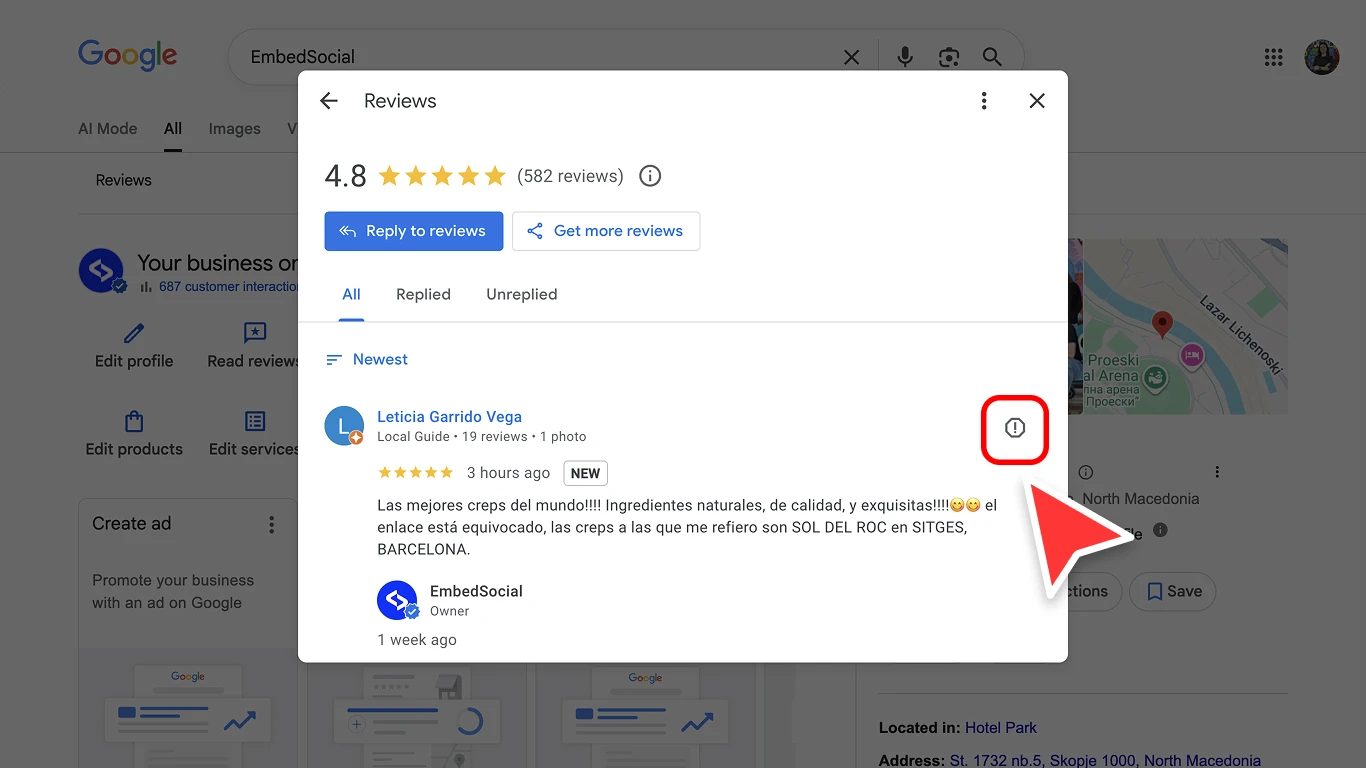
Flag icon next to a Google review in the reviews panel -
Select the reason that best describes why the review violates Google’s policies. Off-topic if the review is not about an experience at your business. Spam if the review is fake, posted by a bot, or part of a coordinated campaign. Conflict of interest if the reviewer is a competitor, former employee, or has a personal connection. Profanity or bullying if the review contains offensive language or personal attacks. Discrimination or hate speech if the review targets a protected group. Personal information if the review contains phone numbers, addresses, or other private data.
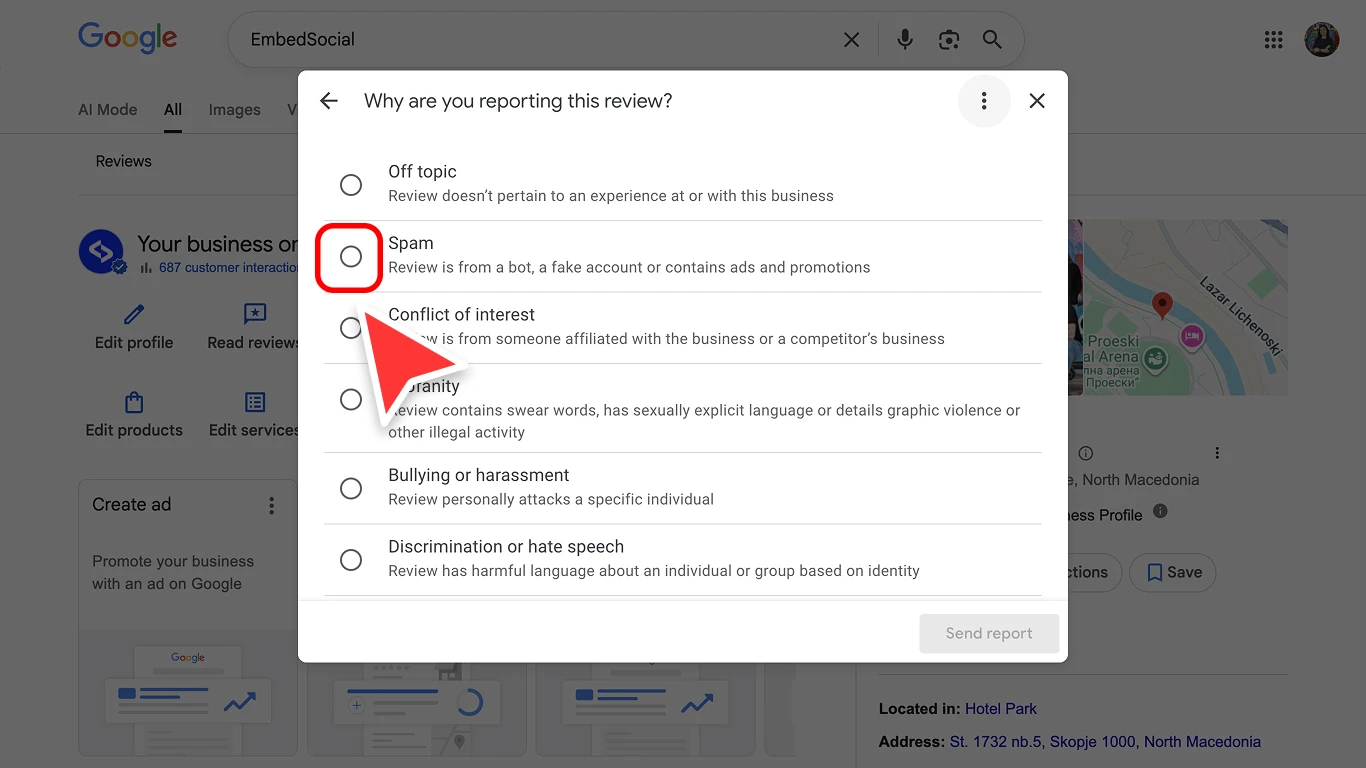
Google review report form showing violation categories like Spam, Conflict of interest, and Profanity -
Submit the report.


Step 3: Wait for Google’s decision
After submitting, you will see a confirmation that the review has been reported to Google.

Google will review your report within 5 to 20 business days. You will receive an email notification with the outcome. Google does not remove reviews simply because they are negative. The review must violate a specific content policy.
Which policy to cite when you flag a review
The reason you pick decides whether the report succeeds. Google evaluates the review against the policy you name, not against how unfair the review feels. Choosing a category that does not fit is the most common reason a flag is rejected.
| What is wrong with the review | Category to select | What Google looks for |
|---|---|---|
| Reviewer was never a customer | Spam | Patterns such as no other review history, several reviews posted the same day, or generic wording |
| Posted by a competitor, employee, or the owner | Conflict of interest | A demonstrable relationship or commercial motive |
| Contains a phone number, address, or full name | Personal information | Private data visible in the review text |
| Insults, slurs, or threats | Profanity or bullying | Abusive language aimed at a person |
| Targets a protected group | Discrimination or hate speech | Language attacking identity |
| About a different location or business | Off-topic | Content unrelated to an experience at your business |
| Promotes another business or links out | Spam | Promotional links or repeated posting |
Flag once per review, using the single strongest category. Reporting the same review repeatedly under different reasons does not improve your chances and can slow the decision down.
How long Google takes to remove a review
Google usually returns a decision within 5 to 20 business days. Clear-cut cases, such as a review containing a phone number or obvious promotional spam, tend to resolve faster. Borderline cases take longer and are more likely to be declined.
You will get an email when the decision is made. If nothing arrives after 20 business days, treat the flag as declined and move to the appeal.
Two things to keep in mind while you wait:
- The review stays visible. Flagging does not hide it, and your rating is unaffected until Google acts.
- Do not flag it again. A second report on the same review restarts the queue rather than escalating it.
How to appeal a rejected review removal
If Google declines to remove a review after your initial flag, you can appeal.
- Go to the Google Business Profile support page.
- Navigate to Manage reviews and select Appeal a review removal.
- Provide the specific policy violation and any supporting evidence. Be factual and specific. For example: “This reviewer has never been a customer. They are a competitor operating at [address]. Their review was posted on the same day they left negative reviews on three other businesses in our category.”
- Submit the appeal and wait for Google’s response.
Appeals are reviewed by a different team than the initial flag. If you have clear evidence of a policy violation, appeals have a higher success rate than the initial report.
What a successful appeal looks like
Appeals succeed on evidence, not on tone. Name one policy, then prove it:
This review violates the conflict of interest policy. The reviewer owns [competing business name] at [address], which their public profile lists. The review was posted on [date], the same day they left one-star reviews on three other [category] businesses within two miles of our location. We have no transaction record matching their name.
Keep it factual and short. Avoid describing the commercial damage, which is not something Google weighs. Attach screenshots or links wherever they prove the claim rather than assert it.
Types of reviews Google will remove
Google removes reviews that violate their content policies. Here are the most common violations:
- Fake reviews: Reviews from people who were never customers, or reviews purchased from review farms
- Spam: Duplicate reviews, reviews containing promotional links, or bot-generated content
- Conflict of interest: Reviews from competitors, current or former employees, or business owners reviewing their own business
- Offensive content: Reviews containing hate speech, threats, sexually explicit content, or personal attacks
- Personal information: Reviews that share phone numbers, email addresses, physical addresses, or other private data
- Off-topic: Reviews about a different business, political commentary, or personal rants unrelated to the business experience
Types of reviews Google will NOT remove
Google will not remove a review just because it is negative, inaccurate, or unfair. These types of reviews typically stay up:
- Negative but honest experiences: A customer who had a bad experience is allowed to share it, even if you disagree
- Low star ratings without text: A 1-star review with no written content does not violate any policy
- Opinions you disagree with: Subjective opinions (“the food was bland”, “the staff seemed rude”) are protected
- Old reviews: Reviews do not expire. A review from three years ago will stay up indefinitely
The best response to a negative but legitimate review is a professional, empathetic reply. Responding well shows future customers that you care about feedback and take steps to improve. Our guides on how to respond to Google reviews and Google review response examples cover the templates and tone. The broader Google reputation management playbook explains how reply quality compounds over time.
Are Google review removal services worth it?
Searches for review removal services run into the hundreds every month, and the market answering them is uneven. It helps to know what is actually being sold.
What a legitimate service does. Reputable agencies do the same work you can do. They identify which policy a review breaks, write an evidence-based flag, submit the appeal, and follow up. They are selling you time and experience, not access. Some also handle legal correspondence when a review crosses into defamation.
What no service can do. Nobody has a back channel to Google. No provider can guarantee removal, and a guarantee is a reason to walk away. Google removes reviews that break policy and keeps reviews that do not, regardless of who files the report.
What to avoid outright. Services offering to bury a bad review under new positive ones are selling review gating or fake reviews. Both break Google’s policies, and the penalty lands on your profile rather than theirs. The same applies to anyone offering to remove reviews from a profile they do not manage.
If you have a handful of clearly policy-breaking reviews, the flag and appeal process in this guide is the same process a service would run for you. If you are handling volume across many locations, the useful investment is usually tooling and a defined workflow rather than per-review fees.
When the legal route makes sense
A small number of reviews are not policy problems, they are legal ones. A review that states a false fact about your business, rather than an opinion, may be defamatory depending on where you operate.
The line usually falls between these two:
- Opinion, which is protected. “The service felt slow and the room was tired.”
- False statement of fact, which may not be. “They operate without a licence and were shut down by the health department.”
If a review makes a concrete false claim that is damaging and provably untrue, speak to a lawyer in your jurisdiction. Courts can order removal, and Google acts on court orders through its legal removal process. The route is slow and costly, so it is worth reserving for reviews causing real commercial harm.
Do not threaten legal action in a public reply. It escalates the thread, it reads badly to every future customer who sees it, and it rarely moves the reviewer.
What happens to your star rating after a review is removed
When Google removes a review, it drops out of both your average and your review count. The recalculation is not instant, so expect the visible rating to update within a few days.
Two side effects catch people out:
- Your reply goes with it. If you replied before the review was removed, the reply is removed too.
- The count moves down. Losing a review lowers your total, which matters if you sit near the threshold where Google starts showing a star rating at all.
If the review is gone from the public listing but your rating has not moved after several days, caching is the usual cause rather than an error.
What to do while a flagged review is still live
Assume the review will stay up. That assumption produces better decisions.
- Reply within a day or two. A calm, specific reply is read by far more people than the review itself, and it is the only part of the exchange you control.
- Do not confirm private details. Never name a customer, describe their order, or reference a medical or legal matter in public.
- Move the conversation off the profile. Offer a direct contact route and resolve it there.
- Log the pattern. If several reviews raise the same complaint, they are describing an operational problem rather than a reputation problem.
For the wording itself, see how to respond to negative reviews.
How to manage reviews at scale
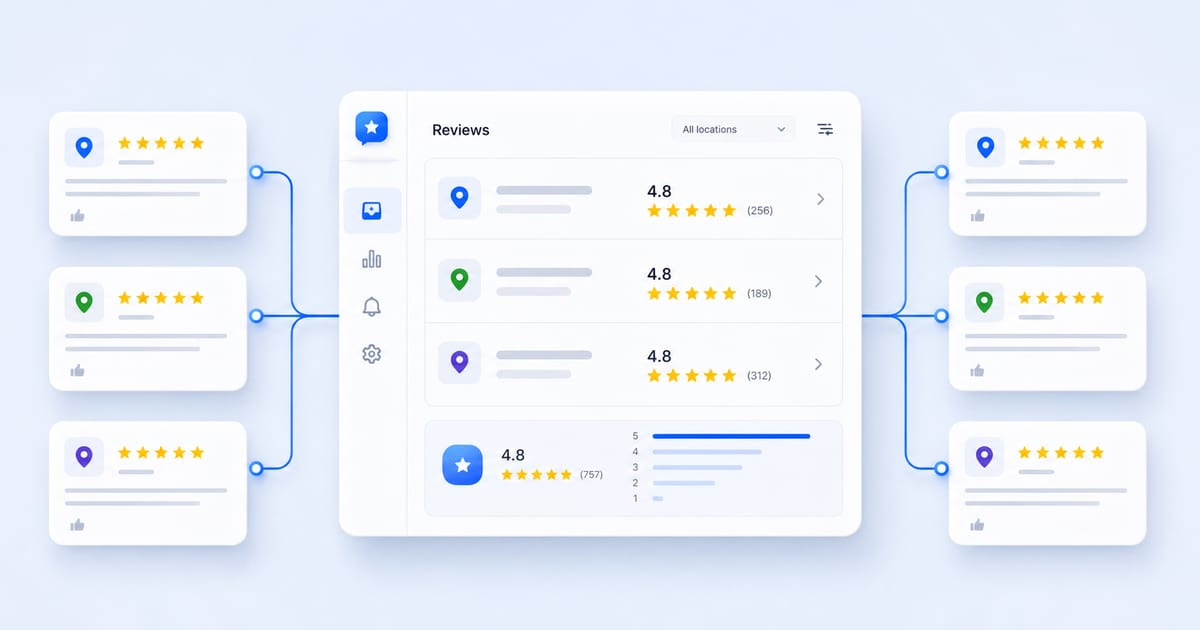
If you manage multiple business locations, flagging and responding to reviews one by one across separate Google accounts gets unmanageable fast. See our guide on managing Google reviews across multiple locations for the operational pattern. If your reply box itself is missing, start with the diagnostic in why can’t I reply to a Google review before anything else.
Localith brings all reviews from every location into a single inbox. The AI Review Reply Agent generates brand-aligned responses in seconds, auto-replies to routine positive reviews, and flags negative reviews for your team to handle. You can respond to hundreds of reviews across dozens of locations without logging into each Google account separately.
Start a free trial to see how it works with your locations.
How to reduce fake reviews going forward
Removal is reactive. The businesses that spend the least time on it are the ones that make fake reviews easy to evidence and genuine reviews plentiful.
- Build volume from real customers. A profile with 400 reviews absorbs a fake one-star rating without moving. A profile with 12 does not. Our guide on how to ask for Google reviews covers the policy-safe ways to do it.
- Never gate reviews. Filtering unhappy customers away from the review form breaks Google’s policy and puts the whole profile at risk.
- Watch for bursts. Several reviews arriving within hours from accounts with no history is the clearest fake-review signal, and the easiest thing to evidence in a flag.
- Keep the profile accurate. Wrong hours and outdated addresses generate genuine one-star reviews that no flag will remove. A regular Google Business Profile audit catches these before customers do.
- Give reviews an owner. Reviews left unanswered for weeks are the ones that turn into escalations.
Conclusion: removal is the exception, not the strategy
You can delete any review you wrote yourself, immediately and permanently. You cannot delete a customer’s review, and the only lever that works is a well-evidenced flag against a specific Google policy, followed by an appeal when the first report is declined.
Most negative reviews will stay up, and that is the normal outcome rather than a failure. What decides how much they cost you is the reply underneath them, the volume of genuine reviews around them, and how fast your team notices.

Automate your Google review replies today. Set up AI-powered responses and brand voice controls for all your locations in minutes. 7-day trial with 100 AI credits. From $9/mo for 2 locations. 4.4 on G2.
Start free trial